About This App
- Name VideoDownloaderPro
- Category Video Players & Editors
- Price 0
- Safety 100% Safe
- Developer SolidDevsKit
- Version 4.9.0

Description
Lightning-Fast Video Downloader & HD Player
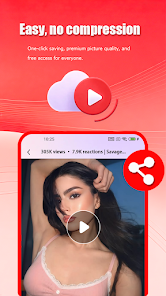
VideoDownloaderPro is the ultimate all-in-one tool for acquiring and playing videos on your mobile phone. Its clean, minimalist interface delivers a smoother, more fluid user experience.
Core Advantages
🚀 Lightning-Fast Downloads — Powered by an efficient engine to quickly save online videos
🎬 Multi-Format Support — Compatible with major video formats (MP4, MOV, AVI, etc.) and various resolutions
📺 4K Ultra HD Playback — Features native hardware decoding for crisp, smooth video quality
🧩 Instant Usability — Simple, intuitive interface with absolutely no complex settings
🔄 Continuous Improvement — Regular feature updates and performance optimizations
Key Features
Intelligently detects clipboard links; one-tap parsing and downloading
Supports simultaneous multi-task downloading; runs seamlessly in the background
Retrieve content from popular social media platforms and video hosting sites
Built-in all-in-one player with hardware acceleration support to effectively reduce battery consumption
Access saved videos offline—watch anytime, anywhere, without an internet connection
How to Use
Copy the link to the video you wish to download
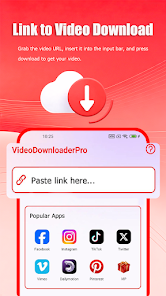
Open VideoDownloaderPro and paste the video link into the input box
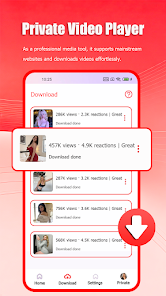
Tap the "Download" button, and the video will be added to your "Downloads" list
Once the download is complete, go to the "Downloads" section, select your video, and enjoy seamless offline playback
Ideal Use Cases
Curate your favorite short videos and TV show clips to relive memorable moments anytime
Download educational courses and knowledge-based videos to build your personal mobile learning library
Organize your personal video archives—safeguard precious memories like family gatherings and travel footage
More Thoughtful Features
One-tap quick download queue
Comprehensive download history and management
Easily share downloaded videos with friends
Battery-saving playback mode to extend device battery life
Intelligent background downloading that won't interrupt other tasks
Privacy & Security Statement
We prioritize your data security:
All downloaded content is stored exclusively on your local device
The app supports full offline usage; no internet connection is required for authorization
We do not collect any personal or private information
Helpful Tips
We recommend connecting to a Wi-Fi network when downloading large files to save on mobile data usage
Enabling background download permissions can significantly boost multi-tasking efficiency
Experience It Now
Get VideoDownloaderPro today and enjoy a comprehensive, high-definition video downloading and playback service—completely free of charge.
Disclaimer: This application is a third-party tool and is not officially affiliated with any video hosting platforms. Before downloading any videos, please ensure that you possess the legal rights to the relevant content or have obtained the necessary authorization. Furthermore, please adhere to national copyright laws and regulations, and respect the creative efforts of the original authors.
Future Update Roadmap
We will continue to roll out:
Performance optimizations and stability fixes
Brand-new interactive features and UI refinements
Broader compatibility across a wider range of websites
Upgrades to our core download engine for even faster speeds
Frequently asked questions
If you're an Android user and don't download the app from the official Google Play Store, you may find the installation process more complicated than usual.
We fully understand your concern about safety. We agree that one person wouldn't be too careful in the cyber world. Meanwhile, we are happy to tell you that one of our priorities is to provide our users with safe app files that they can use without any worries.
We guarantee that all the app files we provide originate from official and reliable sources. We promise that they do not contain any malware that will harm your hardware or the safety of your privacy.
We are happy to inform you that the answer is an absolute YES! All the apps on our website are 100% free to download. Besides, you do not have to create an account. Just click on the download button, and it's done.
Recently we received a lot of emails from our users saying they couldn't log in for different reasons, such as "forgot the user name or password" or "had a new phone." We are willing to help you out. Please read the notes below to see what we can do.
To answer this question, please first let us know which account you're referring to.
If you're referring to your account of some app, like your Facebook account or your Youtube account, unfortunately we would not be able to help in this case. We would suggest you turn to the customer service of this application.
This question is essentially quite similar to the prior one. It's a pity that we are unable to help you cancel the subscription to a third-party application directly, while we would suggest you contact its customer service for further information.
Sorry that we are unable to help you get a refund from a third-party application directly. If you wish to get a refund from a third-party app, we would suggest you contact its customer service. We would be happy to provide you the way to contact them.
If you want a refund from us, we should apologize for your confusion. Our service is 100% free, and any payment information is not required.
If you run into any site that asks you to provide your payment information, be careful. Remember never to reveal your payment information to any unauthorized third parties, no matter how tempting their offer may seem.
Sorry that we cannot answer this question directly, as this section only aims to answer some general questions. You may find how to use a certain app by checking our review page.